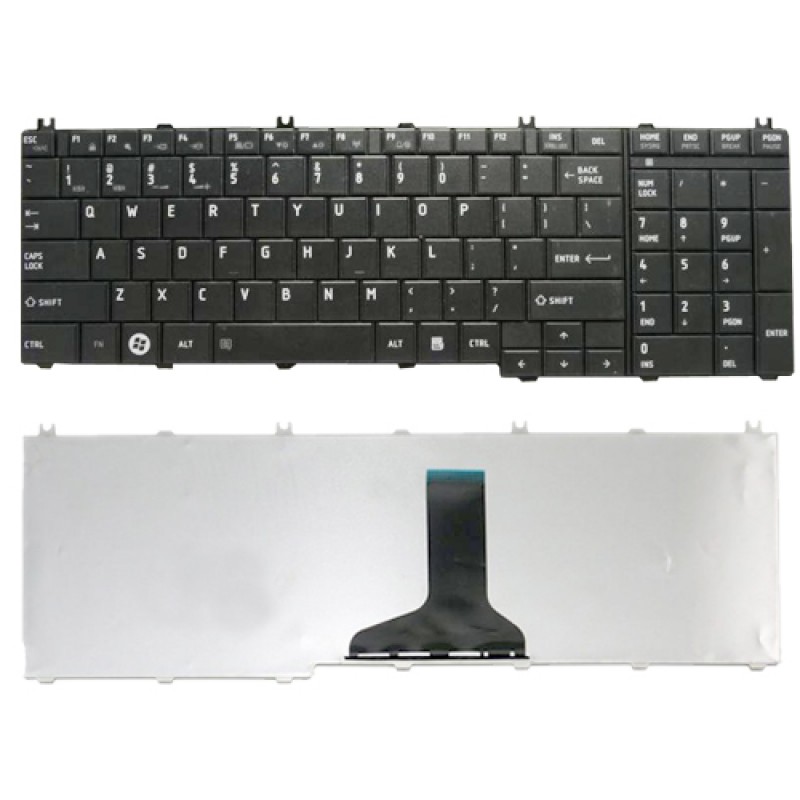

| Specifications | |||||||||||||||||||||||||||||||||||||||||||||||||||||||||||||||||||||||||||||||||||||||||||||||||||||||||||||||||||||||||||||||||||||||||||||||||||||||||||||||||||||||||||||||||||||||||||||||||||||||||||||||||||||||||||||||||||||||||||||||||||||||||||||||||||||||||||||||||||||||||||||||||||||||||||||||||||||||||||||||||||||||||||||||||||||||||||||||||||||||||||||||||||||||||||||||||||||||||||||||||||||||||
|---|---|---|---|---|---|---|---|---|---|---|---|---|---|---|---|---|---|---|---|---|---|---|---|---|---|---|---|---|---|---|---|---|---|---|---|---|---|---|---|---|---|---|---|---|---|---|---|---|---|---|---|---|---|---|---|---|---|---|---|---|---|---|---|---|---|---|---|---|---|---|---|---|---|---|---|---|---|---|---|---|---|---|---|---|---|---|---|---|---|---|---|---|---|---|---|---|---|---|---|---|---|---|---|---|---|---|---|---|---|---|---|---|---|---|---|---|---|---|---|---|---|---|---|---|---|---|---|---|---|---|---|---|---|---|---|---|---|---|---|---|---|---|---|---|---|---|---|---|---|---|---|---|---|---|---|---|---|---|---|---|---|---|---|---|---|---|---|---|---|---|---|---|---|---|---|---|---|---|---|---|---|---|---|---|---|---|---|---|---|---|---|---|---|---|---|---|---|---|---|---|---|---|---|---|---|---|---|---|---|---|---|---|---|---|---|---|---|---|---|---|---|---|---|---|---|---|---|---|---|---|---|---|---|---|---|---|---|---|---|---|---|---|---|---|---|---|---|---|---|---|---|---|---|---|---|---|---|---|---|---|---|---|---|---|---|---|---|---|---|---|---|---|---|---|---|---|---|---|---|---|---|---|---|---|---|---|---|---|---|---|---|---|---|---|---|---|---|---|---|---|---|---|---|---|---|---|---|---|---|---|---|---|---|---|---|---|---|---|---|---|---|---|---|---|---|---|---|---|---|---|---|---|---|---|---|---|---|---|---|---|---|---|---|---|---|---|---|---|---|---|---|---|---|---|---|---|---|---|---|---|---|---|---|---|---|---|---|---|---|---|---|---|---|---|---|---|---|---|---|---|---|---|---|---|---|---|---|---|---|---|---|---|---|---|---|---|---|---|---|---|---|---|---|---|---|---|---|---|---|
| Layout | US | ||||||||||||||||||||||||||||||||||||||||||||||||||||||||||||||||||||||||||||||||||||||||||||||||||||||||||||||||||||||||||||||||||||||||||||||||||||||||||||||||||||||||||||||||||||||||||||||||||||||||||||||||||||||||||||||||||||||||||||||||||||||||||||||||||||||||||||||||||||||||||||||||||||||||||||||||||||||||||||||||||||||||||||||||||||||||||||||||||||||||||||||||||||||||||||||||||||||||||||||||||||||||
| Color | Black | ||||||||||||||||||||||||||||||||||||||||||||||||||||||||||||||||||||||||||||||||||||||||||||||||||||||||||||||||||||||||||||||||||||||||||||||||||||||||||||||||||||||||||||||||||||||||||||||||||||||||||||||||||||||||||||||||||||||||||||||||||||||||||||||||||||||||||||||||||||||||||||||||||||||||||||||||||||||||||||||||||||||||||||||||||||||||||||||||||||||||||||||||||||||||||||||||||||||||||||||||||||||||
| Conditiion | Brand New | ||||||||||||||||||||||||||||||||||||||||||||||||||||||||||||||||||||||||||||||||||||||||||||||||||||||||||||||||||||||||||||||||||||||||||||||||||||||||||||||||||||||||||||||||||||||||||||||||||||||||||||||||||||||||||||||||||||||||||||||||||||||||||||||||||||||||||||||||||||||||||||||||||||||||||||||||||||||||||||||||||||||||||||||||||||||||||||||||||||||||||||||||||||||||||||||||||||||||||||||||||||||||
| Brand | Toshiba | ||||||||||||||||||||||||||||||||||||||||||||||||||||||||||||||||||||||||||||||||||||||||||||||||||||||||||||||||||||||||||||||||||||||||||||||||||||||||||||||||||||||||||||||||||||||||||||||||||||||||||||||||||||||||||||||||||||||||||||||||||||||||||||||||||||||||||||||||||||||||||||||||||||||||||||||||||||||||||||||||||||||||||||||||||||||||||||||||||||||||||||||||||||||||||||||||||||||||||||||||||||||||
| Remarks | Ribbon Cable Included | ||||||||||||||||||||||||||||||||||||||||||||||||||||||||||||||||||||||||||||||||||||||||||||||||||||||||||||||||||||||||||||||||||||||||||||||||||||||||||||||||||||||||||||||||||||||||||||||||||||||||||||||||||||||||||||||||||||||||||||||||||||||||||||||||||||||||||||||||||||||||||||||||||||||||||||||||||||||||||||||||||||||||||||||||||||||||||||||||||||||||||||||||||||||||||||||||||||||||||||||||||||||||
| Warranty | 1 Year Warranty | ||||||||||||||||||||||||||||||||||||||||||||||||||||||||||||||||||||||||||||||||||||||||||||||||||||||||||||||||||||||||||||||||||||||||||||||||||||||||||||||||||||||||||||||||||||||||||||||||||||||||||||||||||||||||||||||||||||||||||||||||||||||||||||||||||||||||||||||||||||||||||||||||||||||||||||||||||||||||||||||||||||||||||||||||||||||||||||||||||||||||||||||||||||||||||||||||||||||||||||||||||||||||
| Compatible Part Number |
| ||||||||||||||||||||||||||||||||||||||||||||||||||||||||||||||||||||||||||||||||||||||||||||||||||||||||||||||||||||||||||||||||||||||||||||||||||||||||||||||||||||||||||||||||||||||||||||||||||||||||||||||||||||||||||||||||||||||||||||||||||||||||||||||||||||||||||||||||||||||||||||||||||||||||||||||||||||||||||||||||||||||||||||||||||||||||||||||||||||||||||||||||||||||||||||||||||||||||||||||||||||||||
| Compatible Models |
| ||||||||||||||||||||||||||||||||||||||||||||||||||||||||||||||||||||||||||||||||||||||||||||||||||||||||||||||||||||||||||||||||||||||||||||||||||||||||||||||||||||||||||||||||||||||||||||||||||||||||||||||||||||||||||||||||||||||||||||||||||||||||||||||||||||||||||||||||||||||||||||||||||||||||||||||||||||||||||||||||||||||||||||||||||||||||||||||||||||||||||||||||||||||||||||||||||||||||||||||||||||||||
PCTECH Product Specific Return Policies
Our Product Specific Return Policy explains the applicable replacement, refund, and service conditions for different categories of products purchased from PCTECH.
The applicable return period depends on the product category and the nature of the issue reported. Customers are requested to inspect and test products promptly after delivery and follow the applicable requirements described below.
Customers are required to record a clear, continuous, and complete video from the moment the package is received, through the unboxing process, product inspection, and initial testing or installation wherever applicable.
This video is not limited to warranty claims. It serves as an important record of safe delivery, the condition of the product at the time of receipt, proper handling, testing, and installation.
The purpose of the unboxing and installation video is to establish a clear and verifiable record of the product from the time it is delivered until it is opened, inspected, connected, tested, and installed.
For technical spare parts, the video can also help establish how the product was handled and installed before any subsequent issue is reported.
Customers should not open, install, modify, dismantle, or otherwise alter a technical spare part before recording the required unboxing evidence.
The recording should clearly capture the following:
- The package immediately after delivery.
- The courier or shipping label and tracking information.
- The complete external condition of the package before opening.
- Any dents, tears, punctures, crushing, watermarks, or other visible packaging damage.
- The complete process of opening the package.
- All protective packaging, bubble wrap, foam, boxes, seals, and other materials.
- The product immediately after it is removed from the packaging.
- The product labels, part number, serial number, connectors, and physical condition wherever applicable.
- Any visible damage, defect, missing component, or discrepancy.
- The initial connection, testing, or installation process wherever applicable.
- The condition and functioning of the product during initial testing.
- A continuous recording without unexplained interruptions wherever possible.
The original packaging and protective materials should be retained until the product has been fully inspected, tested, and the applicable return or warranty period has passed.
In the event of a dispute regarding delivery condition, transit damage, missing items, product condition, handling, installation, or a subsequent return or warranty claim, the unboxing and installation video may be requested as evidence for assessment.
Failure to maintain the required video evidence may make it difficult to establish the condition of the product at the time of delivery or determine when damage occurred.
Return Policy Contents
Product Specific Return Policies
The following return and replacement periods apply according to the product category and the type of issue reported.
| Category | Defective or Damaged | Item Not as Described |
|---|---|---|
| Computers | 10 Days Free Replacement | 10 Days Replacement / Refund |
| Computers / Laptop Accessories | 10 Days Free Replacement | 10 Days Replacement / Refund |
| Computer / Laptop Spare Parts | 10 Days Free Replacement | 10 Days Replacement / Refund |
| Technical / Engineering Services | 30 Days Free Service for the Same Issue | N/A |
Important: The applicable return or replacement period depends on the product category and the nature of the reported issue. Customers should report the issue within the applicable period and provide the information or evidence requested by PCTECH.
Item Not as Described
Our "Item Not as Described" policy ensures that customers receive products that match the description provided at the time of purchase.
If a customer receives an item that does not meet the described specifications, features, or condition, the following policy applies:
1. Eligibility
The policy is applicable to all eligible purchases where the product received significantly differs from its description.
Color, shape and part numbers of items like battery chargers, batteries, keyboards and screens etc. are not treated as "item not as described" until its technical specifications are totally different.
2. Notification
Customers must notify our customer support within a specified time frame, depending upon category, to report the issue and initiate the resolution process.
3. Verification
Our customer support team may request additional information, such as photographs, detailed descriptions, or any other evidence that supports the claim of the item not being as described.
4. Resolution Options
Depending on the circumstances, the following options may be provided to the customer:
a. Replacement
The customer may be eligible for a replacement of the product with one that matches the description originally provided.
b. Refund
If a replacement is not feasible, we may refund for the item.
Important: Replacement or refund will not be applicable if the returned item is found to be damaged due to mishandling during installation or removal, improper use, or negligence.
Customers are advised to approach an expert technician for installation of spare parts, handle products carefully and follow the usage guidelines to ensure eligibility for returns or replacements.
5. Return Process
If the item needs to be returned, our customer support team will provide instructions for the return shipment, including any applicable shipping labels or arrangements for pick-up.
6. Condition of Return
The customer may be required to return the item in its original condition, packaging, and with all accessories included.
7. Evaluation and Final Decision
Once the returned item is received, our returns department will evaluate its condition to verify the claim.
Based on the evaluation, the final decision regarding the resolution, replacement or refund, will be made.
↑ Back to Return Policy ContentsIn-Transit Damage
Products may occasionally sustain damage during the transit process. To ensure a smooth resolution process for in-transit damage claims, customers are required to provide the mandatory unboxing video as evidence.
The unboxing video allows PCTECH to visually assess the condition of the package and its contents upon arrival. It helps establish a clear timeline and provides valuable evidence regarding how the item was packaged, handled, and the extent of any damage incurred during transportation.
Mandatory Requirement: Customers must record the package and product condition from the beginning of the unboxing process. The recording should be continuous and should clearly show the condition of the package before it is opened.
Where transit damage is suspected, customers should immediately document the damage and retain the complete original packaging, including all protective materials.
The unboxing video may be required for assessment of an in-transit damage claim and may assist PCTECH in determining the appropriate resolution.
↑ Back to Return Policy ContentsMandatory Unboxing Video Instructions
The following steps should be followed when creating the mandatory unboxing video.
1. Start from the Initial Unboxing
Begin recording the video from the moment you receive the package.
Capture the exterior condition of the packaging, highlighting any signs of damage, such as dents, tears, punctures, crushing, watermarks, or other visible damage.
2. Document the Unpacking Process
Record the step-by-step process of opening the package, emphasizing the care taken while removing any protective materials or seals.
Be sure to capture any visible damage or indications of mishandling.
3. Focus on the Product
Provide clear footage of the product after it has been removed from the packaging.
Capture the product from different angles where necessary and clearly record any visible damage, defects, missing components, labels, part numbers, connectors, or other relevant details.
4. Preserve the Packaging
Retain the original packaging, including any bubble wrap, foam inserts, boxes, seals, or other protective materials used during shipping.
This helps provide a comprehensive view of how the product was packaged and the level of protection provided during transportation.
5. Maintain a Continuous Recording
Try to maintain an uninterrupted recording throughout the unboxing process to ensure transparency and avoid any doubts regarding the sequence of events.
6. Record Initial Testing
Where applicable, continue the recording through the initial testing of the product.
For technical spare parts, customers should record the initial connection or testing process wherever practical and appropriate.
7. Record Installation Where Applicable
For products requiring technical installation, customers are encouraged to maintain a clear record of the installation and initial testing process.
This is particularly important for technical spare parts such as laptop screens, laptop batteries, keyboards, adapters, DC jacks, hinges, and other components requiring removal of existing parts or technical installation.
Important: The purpose of maintaining the unboxing and installation record is to establish a clear history of the product's condition from delivery through inspection, testing, and installation.
Installation and Handling Responsibility
Technical spare parts are not necessarily plug-and-play products.
Many laptop and computer spare parts require technical knowledge, specialist tools, proper handling, and professional installation.
Customers are strongly advised to approach an expert technician for installation of technical spare parts.
Customers are responsible for ensuring that products are handled and installed correctly.
Replacement or refund will not be applicable if the returned item is found to be damaged due to:
- Mishandling during installation
- Mishandling during removal
- Improper use
- Negligence
- Incorrect installation
- Incorrect connection
- Use of inappropriate tools
- Physical force applied to the product or connector
- Other installation-related damage
Customers should handle products carefully and follow appropriate installation and usage procedures to help ensure eligibility for applicable returns or replacements.
Laptop Screen Installation
Laptop LCD screens are particularly delicate components. The LCD panel, display cable, connector, mounting points, and surrounding assembly can be damaged during installation or removal.
Professional installation is strongly recommended for laptop screen replacements.
Laptop Battery Installation
Laptop batteries may contain sensitive electronic circuits and connectors. Incorrect installation, short circuits, physical damage, or improper handling can damage the battery or the laptop.
Professional installation is recommended wherever technical expertise is required.
Other Technical Spare Parts
The same principle applies to keyboards, adapters, DC jacks, hinges, motherboards, cooling components, and other technical spare parts that require dismantling or installation.
↑ Back to Return Policy ContentsReturn Evaluation and Final Decision
Once a returned item is received, the returns department may evaluate the product and its condition to verify the reported issue.
The evaluation may include inspection of the product, packaging, accessories, labels, part numbers, physical condition, and other relevant evidence.
The submitted photographs, videos, unboxing recording, installation record, order details, and other information may also be reviewed where applicable.
Evaluation of Item Not as Described Claims
For an "Item Not as Described" claim, PCTECH may compare the product received against the product description and specifications applicable at the time of purchase.
Differences in colour, shape, appearance, or part number alone will not necessarily qualify as an "Item Not as Described" claim where the technical specifications remain the same or substantially consistent with the product description.
Evaluation of Damage Claims
For damage-related claims, PCTECH may evaluate whether the reported damage was present when the product was received or whether it may have occurred after delivery, including during handling, installation, removal, testing, or use.
Final Decision
Based on the evaluation, the final decision regarding the applicable resolution, including replacement, refund, or service where applicable, will be made according to the applicable Product Specific Return Policy and the circumstances of the claim.
Important: The availability of a replacement or refund does not mean that every reported issue automatically qualifies. Eligibility is subject to the applicable category, reporting period, condition of the returned product, verification, and final evaluation.
Return Process
If you believe that the product received is defective, damaged, or significantly different from its description, contact PCTECH customer support within the applicable return period.
Provide your Order ID, product name, and a clear description of the issue.
Provide photographs, videos, unboxing video, installation/testing record, or other evidence requested by the customer support team.
Our customer support team may review the submitted information and request additional evidence where necessary.
If the product needs to be returned, our customer support team will provide the applicable return shipment instructions.
Once received, the returned product may be inspected by our returns or technical team.
Based on the evaluation, the applicable replacement, refund, or service resolution will be determined according to the relevant policy.
Condition of Returned Products
Where a return is approved, the customer may be required to return the item in its original condition, packaging, and with all accessories included.
The product should not have been modified, repaired, dismantled, tampered with, or damaged after delivery.
For technical spare parts, customers should take particular care to avoid physical or installation-related damage before returning the product.
Do not send a product back without return authorization.
Customers should contact PCTECH customer support and follow the return instructions provided before shipping the product back.
Packaging and Return Shipment
When a return has been authorized, customers should package the product carefully using appropriate protective materials.
Where possible, the original packaging and protective materials should be used.
The product should be protected from physical damage during the return shipment.
Customers should retain the shipment receipt and tracking details until the return process has been completed.
↑ Back to Return Policy ContentsImportant Customer Notice
Please inspect your package immediately after delivery.
Record the mandatory unboxing video before opening the package and before removing or installing the product.
Do not discard the packaging until the product has been inspected and tested.
For technical spare parts, professional installation is strongly recommended.
- Verify the product received against your order.
- Check the package for visible damage.
- Record the complete unboxing process.
- Inspect the product before installation.
- Do not install a product that appears physically damaged.
- Verify compatibility before installing technical spare parts.
- Use appropriate tools and installation procedures.
- Retain the original packaging and protective materials.
- Contact PCTECH before returning any product.
Contact Us
For return, replacement, or product-related assistance, please contact PCTECH customer support.
Email: cs@pctech.co.in
Phone: +91 9810343724
Please include your Order ID and relevant product details when contacting customer support.
Important Summary
Mandatory Unboxing Video: Customers must record a clear and continuous unboxing video from receipt of the package through unboxing and, where applicable, initial testing or installation. The video serves as evidence of safe delivery, product condition, handling, testing, and installation.
Defective or Damaged Products: The applicable period is 10 Days Free Replacement for Computers, Computers / Laptop Accessories, and Computer / Laptop Spare Parts.
Item Not as Described: The applicable period is 10 Days Replacement / Refund for Computers, Computers / Laptop Accessories, and Computer / Laptop Spare Parts, subject to verification and the applicable return conditions.
Technical / Engineering Services: The applicable period is 30 Days Free Service for the Same Issue.
Installation Damage: Replacement or refund will not be applicable where the returned item is found to have been damaged due to mishandling during installation or removal, improper use, or negligence.
Final Evaluation: All return, replacement, refund, and service requests are subject to verification and evaluation according to the applicable Product Specific Return Policy.